Free Offline
Chess Analysis Software
Analyze Chess.com and Lichess games with Stockfish. Import PGNs, track accuracy, review blunders, and get AI-powered insights—all locally and completely free.
Why Chess Analyzer Pro?
Built by a chess player, for chess players who want local analysis without subscriptions.
Local Database
Build your personal game database locally using SQLite. No cloud upload required. Your privacy is guaranteed.
Stockfish Engine
Direct integration with Stockfish for move-by-move analysis. Runs entirely on your machine.
AI Coach Insights
Get 'Brilliant', 'Great', and 'Blunder' annotations. New AI summaries explain the *why* behind every move in plain English.
Universal Import
Seamlessly import PGNs or fetch games directly from your Chess.com and Lichess profiles using their public APIs.
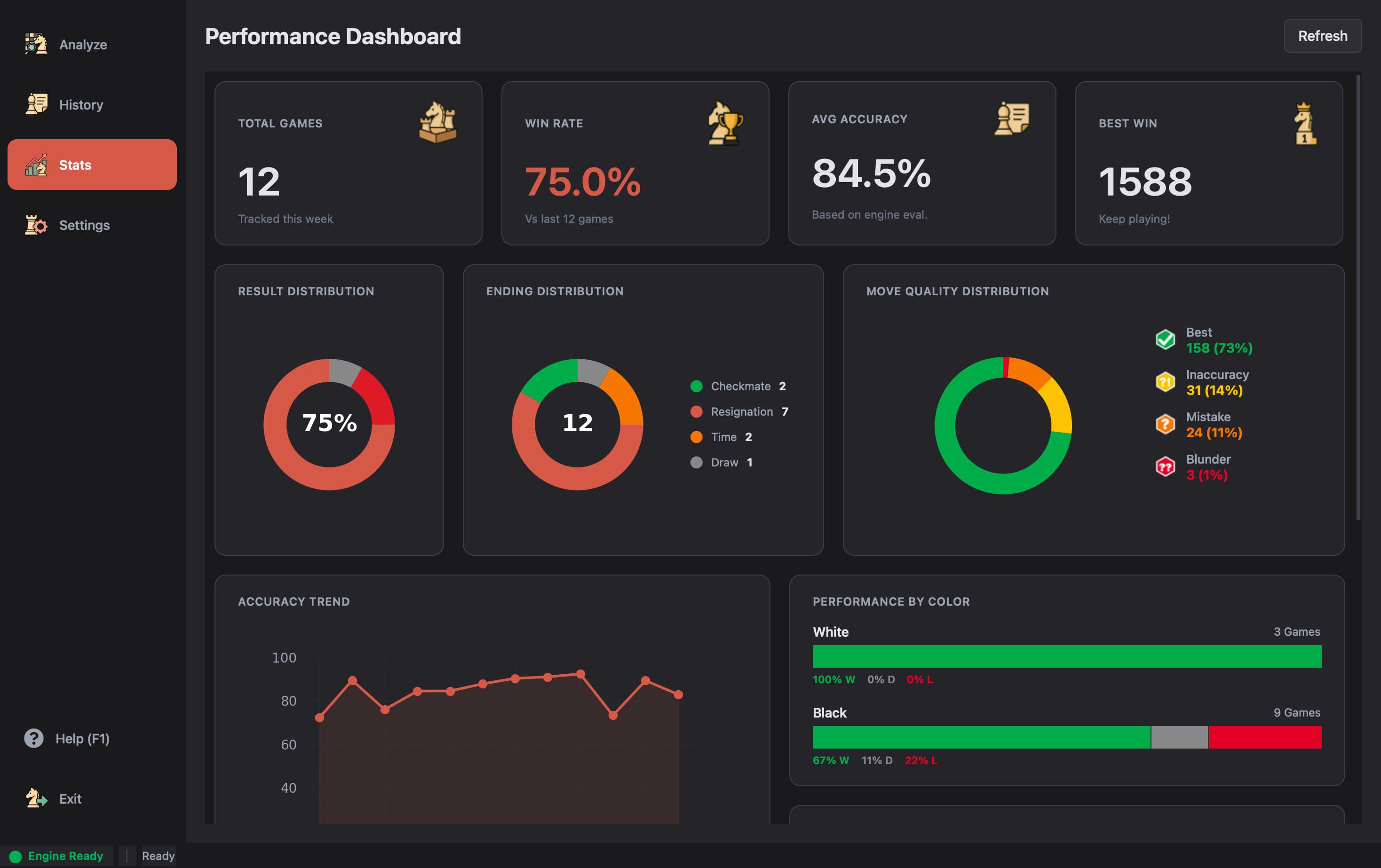
Analytics Dashboard.
No Subscription Needed.
Unlock deep insights into your play style with the built-in Metrics Dashboard. Visualize your opening performance, track accuracy trends, and identify your ending weaknesses.
- Accuracy trend chart over your last N games
- Win/Loss/Draw distribution by opening
- Move quality breakdown — Brilliant to Blunder
How It Works
Analyze your games locally in four simple steps.
Download Tool
Download the precompiled binary for Windows, macOS, or Linux from the releases page, or run natively from source.
Configure Stockfish
Download the free Stockfish chess engine binary and select its executable file path in the application settings.
Load Game
Import standard PGN files, paste raw chess notation, or fetch your games from Chess.com and Lichess using public APIs.
Analyze & Review
Run the local Stockfish engine to get accuracy scores, move classifications, and plain-English AI coach summaries.
See It In Action
A look at the different screens inside the app.
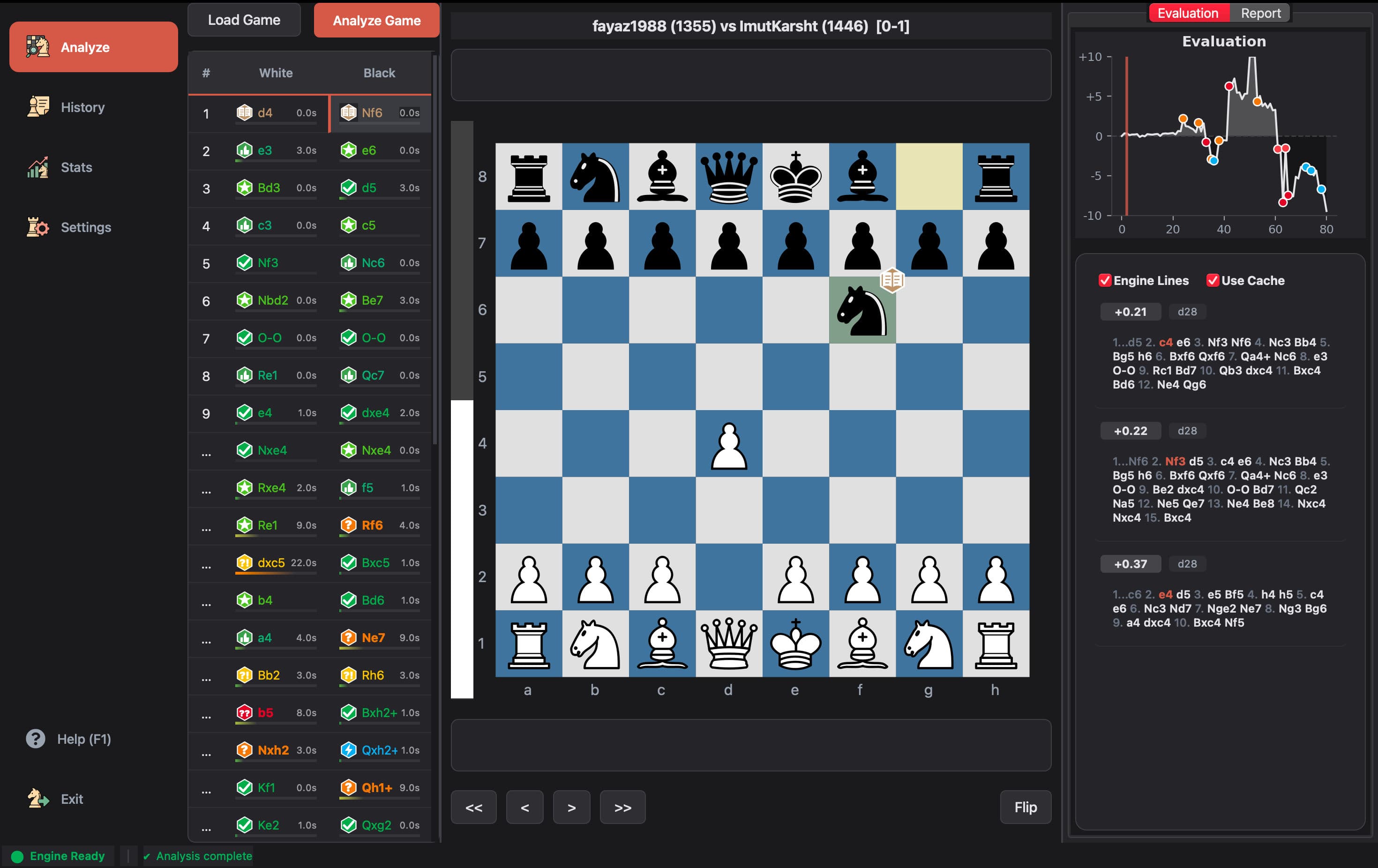
Deep move-by-move analysis with Stockfish. Every move classified — from Brilliant to Blunder.
Why I Built Chess Analyzer Pro.
As a chess enthusiast, I often found myself torn between two worlds. Online platforms offer beautiful, "coach-like" reviews but lock them behind expensive subscriptions. Free desktop tools, on the other hand, often feel outdated and overly technical.
I wanted a middle ground: The raw power of a desktop engine combined with the visual elegance of modern web apps.
Thus, Chess Analyzer Pro was born — a personal project that tries to bridge that gap, freely available to anyone.
My Commitments to You
Clean UI, Free Forever
No subscriptions, no paywalls. The full feature set is available to everyone.
Privacy First
Your games and analysis stay on your machine. No tracking, no data selling.
Offline Capable
Analyze anywhere, anytime. Full engine power without an internet connection.
Open Source
Code available on GitHub. Built for the community, transparent by design.
What Players Say
"👍 great job"
"I tried it, and It was amazing. Really a good handy tool for chess analysis. It is near accurate to chess.com, Would love to see features like rating prediction in end and move by move summary "
"Very nice website for chess players, easy to use and hassle free"
Frequently Asked Questions
Find answers to common questions about Chess Analyzer Pro, its features, and installation.
Is Chess Analyzer Pro free?
Yes, Chess Analyzer Pro is 100% free and open-source under the MIT license. There are no subscription fees, paid tiers, or advertisements. All features are fully available to everyone.
Can it analyze Chess.com and Lichess games?
Yes! You can fetch games directly from your Chess.com or Lichess profiles using their public APIs, or paste game links directly into the loader dialog. It serves as a completely free alternative to Chess.com's premium Game Review.
Does it work offline?
Absolutely. Chess Analyzer Pro is designed as a local-first desktop application. Once installed, the Stockfish engine runs locally on your computer's CPU, and all analyzed games are saved to a local SQLite database on your disk.
Does it use Stockfish?
Yes, Chess Analyzer Pro integrates directly with the Stockfish engine (including Stockfish 16/17). It executes the engine locally on your hardware, allowing you to configure threads, hash tables, and search depth.
Can I import PGN files?
Yes, the app supports importing individual PGN files, batch importing game databases, or pasting raw PGN text directly to perform automated engine analysis.